Hue Iris — the local web controller on the Pi
A Philips Hue Iris floor lamp sits in the living room. It is not on a Hue Bridge: it is paired straight to a Zigbee USB dongle on the Raspberry Pi, driven by Zigbee2MQTT, and controlled from a single-file Python web app that any phone on the home Wi-Fi or on Tailscale can open. This note documents that app — how the pieces fit, what the lamp can and cannot actually do, the HTTP API, and how to operate and debug it.
In one line. A browser posts JSON to a small Python server on the Pi, which publishes it to an MQTT topic; Zigbee2MQTT turns that into a Zigbee command and the lamp obeys — and the same server keeps a live copy of the lamp's state in memory so the page can show what the light is doing without asking the radio every time.
The data path
Every command travels the same five hops, and nothing in the chain touches the internet or a Philips cloud account — the Hue Bridge is absent entirely.
phone or laptop"] APP["hue-iris app.py
port 8091"] PUB["mosquitto_pub
one per command"] SUB["mosquitto_sub
one, forever"] BROKER["Mosquitto broker
127.0.0.1:1883"] Z2M["Zigbee2MQTT
docker"] LAMP["Hue Iris
LLC010"] UI -->|"POST /api/control"| APP APP --> PUB PUB -->|"…/set"| BROKER BROKER --> Z2M Z2M -->|"Zigbee, channel 11"| LAMP LAMP -.->|"state echo"| Z2M Z2M -.-> BROKER BROKER -.-> SUB SUB -.->|"in-memory cache"| APP APP -.->|"SSE /api/events"| UI %% -- dashboard status styles -- classDef ok fill:#DCFCE7,stroke:#16A34A,stroke-width:1.5px,color:#052E16; classDef warn fill:#FEF9C3,stroke:#CA8A04,stroke-width:1.5px,color:#422006; classDef err fill:#FCE7EF,stroke:#DB2777,stroke-width:1.5px,color:#500724; classDef crit fill:#FEE2E2,stroke:#DC2626,stroke-width:1.5px,color:#450A0A; classDef off fill:#F1F5F9,stroke:#94A3B8,stroke-width:1.5px,color:#111827; classDef info fill:#EFF6FF,stroke:#3B82F6,stroke-width:1.5px,color:#0C1E3E;
The two halves are worth separating in your head:
- Downstream (command).
POST /api/control→ validate → onemosquitto_pubtozigbee2mqtt/0x0017880106550bca/set→ Zigbee2MQTT → radio. One short-lived process per user action, which is fine: user actions are rare. - Upstream (state). A single, permanently running
mosquitto_substreams the device topic into a background thread that keeps the latest state in memory. HTTP requests read that memory. This is the part that used to be done wrong; see §5.
The hardware, and what it genuinely supports
The lamp identifies itself to Zigbee2MQTT as follows. This is the authoritative list —
it was read out of zigbee2mqtt/bridge/devices on the live system, not from a datasheet.
| Property | Value |
|---|---|
| Model | 7199960PH — “Hue Iris” |
| Zigbee model ID | LLC010 |
| Vendor | Philips (Signify Netherlands B.V.) |
| IEEE address | 0x0017880106550bca |
| Friendly name | unset — falls back to the IEEE address |
| Device type | Router (mains powered, so it relays for other Zigbee devices) |
| Exposes | light (state, brightness, colour), power_on_behavior, effect, effect_speed, effect_color, linkquality |
The single most important fact about this lamp: it has no white channel. The Iris is an RGB LivingColors unit.
color_tempis not among its exposed features, and sending it is silently ignored by the device.
That was verified directly rather than assumed. Publishing
{"state":"ON","color_temp":450,"brightness":60} to the /set topic produced this echo:
{"brightness":60,"color":{"x":0.6323,"y":0.3497},"color_mode":"color_temp",
 "color_temp":366,"linkquality":12,"state":"ON"}
The brightness and state both took effect; color_temp came back as 366, exactly
what it was before, and the color xy pair did not move. The lamp ignored it. (The
color_temp: 366 and color_mode: "color_temp" fields are Zigbee2MQTT's own bookkeeping
from an older pairing — they are reported, but they are not controllable.)
Sending a colour instead works immediately: {"color":{"hex":"#3f2cff"}} moved the lamp to
{"x":0.1572,"y":0.0621} with color_mode flipping to xy.
Emulating white
Because there is no white channel, the app's White slider is honest about being an
emulation: it converts a colour temperature to a point on the Planckian locus in
CIE 1931 xy and sends that as a colour. The conversion is the Kim et al. cubic
approximation, implemented client-side in cctToXy():
The result is a believable warm-to-cool white from a lamp that is physically mixing red, green and blue to get there. It will never be as clean as a real tunable-white bulb, and deep into the blue end it desaturates rather than getting genuinely cooler.
Running it: service, ports, configuration
The app is one file, ~/smart-home/hue-iris/app.py, running under systemd as
hue-iris.service. It has no Python dependencies beyond the standard library — it
shells out to the mosquitto_pub / mosquitto_sub clients rather than pulling in
paho-mqtt, which keeps the Pi Zero's install surface at zero.
| Piece | Where | Port |
|---|---|---|
| hue-iris — this app, including the sleep timer (§8) | ~/smart-home/hue-iris/app.py | 8091 |
| Zigbee2MQTT | docker, ~/smart-home/zigbee2mqtt/compose.yaml | 8090 → 8080 in container |
| Mosquitto broker | mosquitto.service | 1883 |
| Zigbee coordinator | Sonoff ZBDongle-P on /dev/ttyUSB0 | channel 11 |
~/hue-web/app.py | 8080 | |
~/smart-home/hue-iris-timer/app.py (kept as reference, service disabled) |
Open the page at http://100.109.212.51:8091/ over Tailscale, or
http://192.168.178.119:8091/ on the home LAN. Both were confirmed working.
Configuration is by environment variable, set in the unit file, so nothing needs editing
inside app.py to move the app or repoint it at a different lamp:
| Variable | Default | Meaning |
|---|---|---|
HUE_IRIS_PORT |
8091 |
HTTP listen port |
HUE_IRIS_HOST |
0.0.0.0 |
listen address |
HUE_IRIS_DEVICE |
0x0017880106550bca |
the Zigbee device to control |
MQTT_HOST / MQTT_PORT |
127.0.0.1 / 1883 |
the broker |
Z2M_BASE_TOPIC |
zigbee2mqtt |
must match Zigbee2MQTT's base_topic |
HUE_IRIS_PROBE_INTERVAL |
45 |
seconds between liveness re-reads — see §4.1 |
HUE_IRIS_MAX_STREAMS |
8 |
concurrent SSE clients before 503 |
HUE_IRIS_VERBOSE |
0 |
set to 1 for per-request logging |
Logs go to the journal (journalctl -u hue-iris), not to a file. The previous unit
appended to logs/app.log, which nothing rotated; it had reached 120 KB, of which 38
entries were ConnectionResetError tracebacks from phones locking their screens
mid-request. Those are now swallowed, because they are normal.
The HTTP API
| Route | Returns |
|---|---|
GET / | the control page — gzipped (~10.5 KB from ~31.3 KB, grew across the two 2026-08-23 redesigns) and ETag-revalidated, so a reload costs a 304 |
GET /api/state | the cached snapshot as JSON; weak ETag on a version counter, so an unchanged read is a 304 |
GET /api/events | Server-Sent Events — a frame on every state change, plus a comment heartbeat every 20 s |
POST /api/control | validate a command, publish it, return {ok, sent, snapshot} |
POST /api/radio/refresh | force an immediate re-probe instead of waiting for HUE_IRIS_PROBE_INTERVAL; {ok, snapshot}, or 429 if called again within 3 s — see §7.1 |
GET /healthz | 200 when the MQTT listener is connected and a state has been read; 503 otherwise |
GET /favicon.ico | 204 — cheaper than a 404 on every page load |
A state snapshot separates the device's state from the controller's health:
{
  "state": { "state": "OFF", "brightness": 168, "color": {"x": 0.535, "y": 0.3886},
             "color_mode": "xy", "effect": "none", "power_on_behavior": "previous",
             "linkquality": 12 },
  "version": 7, "age": 2.5,
  "link": "connected", "bridge": "online", "device_ok": true,
  "device": "0x0017880106550bca",
  "radio": {
    "history": [[401.9, 27], [358.1, 30], [301.0, 30], [15.7, 27]],
    "connected_seconds": 403.2,
    "reconnects": 0
  }
}
version increments on every change and drives both the ETag and the SSE fan-out.
age is seconds since the lamp last reported. link is the health of the app's own MQTT
listener, bridge is what zigbee2mqtt/bridge/state says, and device_ok is whether the
lamp answered the last liveness probe — three separate failures that used to be
indistinguishable. radio is new (2026-08-23, see §4.1) —
history is [seconds_ago, lqi] pairs, oldest first, so a client plots it left-to-right
without trusting clock sync; connected_seconds is how long the MQTT listener has held its
current connection; reconnects counts listener drop/reconnect cycles since the service
started.
Live radio telemetry
Before 2026-08-23 the only radio-quality signal was the lamp's last-reported linkquality,
refreshed whenever the five-minute liveness probe or a real command happened to land — so
the UI's "radio link" panel was really a five-minutes-stale snapshot wearing a live-looking
gauge. Two changes made it actually live:
PROBE_INTERVALdropped from300s to45s. The probe (prime()) publishes to Zigbee2MQTT's.../gettopic, which answers from Z2M's own cache rather than always forcing a fresh radio round-trip — so tightening the cadence sixfold is a cheap way to get fresherlinkqualitysamples without materially adding Zigbee traffic to the already-weak link (§10).HUE_IRIS_PROBE_INTERVALis still an env var if this ever needs tuning back down.StateStorenow keeps a rolling history. Every echo with a numericlinkqualityappends(timestamp, lqi)to acollections.deque(maxlen=120)— about 90 minutes of samples at the 45 s cadence — plus aconnected_sincetimestamp and areconnectscounter, both updated inset_link(). All three are exposed on every/api/state/ SSE snapshot as theradioobject above, so a client can plot a trend instead of just a single instantaneous number.POST /api/radio/refresh(added same day, once 45 s still felt too slow for "did that just work?" moments) calls the sameprime()the periodic prober uses — no separate code path — and is rate-limited to one call perMANUAL_REFRESH_COOLDOWN(3 s, a constant, not an env var) so a mashed button can't turn into a flood of.../getpublishes on top of an already-weak radio link. A second call inside the window gets429with the current snapshot rather than a fresh probe.
The interface side of this is in §7 and §7.1.
Accepted command fields
POST /api/control takes a JSON object. Unknown keys are dropped; bad values are
rejected with an explanation rather than being forwarded to the radio.
| Field | Accepted | Notes |
|---|---|---|
state |
ON, OFF, TOGGLE |
case-insensitive |
brightness |
0–254 |
the Zigbee scale, not a percentage |
transition |
0–60 |
seconds of fade |
color |
{"hex":"#rrggbb"} or {"x":…,"y":…} |
hex is converted to CIE xy server-side |
effect |
one of 20 names | candle, fireplace, colorloop, sunset, sunrise, sparkle, opal, glisten, underwater, cosmos, sunbeam, enchant, stop_effect, … |
effect_speed |
0–60 |
|
power_on_behavior |
off, on, toggle, previous |
what the lamp does after a power cut |
color_temp |
— | rejected with HTTP 400. The lamp has no white channel (§2) |
That last row is deliberate. Silently accepting color_temp is what made the old UI's
"White temperature" buttons look like they worked while doing nothing.
How the state is read — and the trap that broke it
This is the substantive bug, and it is worth writing down because it is not obvious.
Zigbee2MQTT does not publish device state as a retained MQTT message unless you turn
retention on per device, which this install does not. The topic
zigbee2mqtt/0x0017880106550bca is therefore silent except in the instant after the
lamp changes. A fresh subscriber receives nothing at all.
The old app read state like this, once per browser poll:
subprocess.run(["mosquitto_sub", "-h", MQTT_HOST, "-t", DEVICE_TOPIC,
                "-C", "1", "-W", "2"], ...)   # wait up to 2 s for one message
Subscribe, wait two seconds for a message that is never coming, give up, return {}. The
browser polled that every four seconds, forever. Measured on the live system before the
rewrite: every single response was empty.
  OLD   15 reads/60s | CPU 0.69s = 1.2% of a core | median 2031.6 ms | empty: 15/15
  NEW   15 reads/60s | CPU 0.12s = 0.2% of a core | median    7.3 ms | empty:  0/15
The consequence in the interface was total: the power pill, the brightness sync, the "last seen" line and the whole link-quality gauge had never once displayed real data. The gauge read “—” and “Waiting for Zigbee status…” permanently.
The fix has two halves:
- Subscribe once, forever. A background thread runs a single
mosquitto_suband parses its output into an in-memory snapshot, with exponential backoff on reconnect. - Ask the lamp to speak. On every connect, the app publishes
{"state":""}tozigbee2mqtt/0x0017880106550bca/get, which makes Zigbee2MQTT emit the device's cached state onto the topic immediately. This is the step that makes the state readable at all — without it the listener would still be waiting for the lamp to change on its own.
A liveness probe repeats that /get every HUE_IRIS_PROBE_INTERVAL seconds (45 by
default — was 300 before 2026-08-23, see §4.1); if no echo follows
within twelve seconds, device_ok flips false and the page says "lamp not responding".
What the rewrite changed
| Before | After | |
|---|---|---|
/api/state latency | 2031 ms | 7.3 ms (≈278× faster) |
| State actually returned | never — {} every time | full device state |
| CPU, one tab open | 1.2 % of a core | 0.2 % |
| Processes spawned | one per state read, forever | one listener, for the lifetime of the service |
| Update mechanism | 4 s poll, also when the tab is hidden | SSE push; poll only as a fallback, and only when visible |
| Colour temperature buttons | present, silently did nothing | replaced by an emulated-white slider, honestly labelled |
| Effects | none exposed | 12 lamp-side effects + stop |
| Page transfer | 19.3 KB, uncached | 6.9 KB gzipped, 304 on reload |
| Failure reporting | errors swallowed to {} | link / bridge / device_ok reported separately |
| Logging | unbounded app.log, 38 tracebacks | journal, rotated; expected disconnects swallowed |
The old file is kept at ~/smart-home/hue-iris/app.py.bak-20260726, and the old log is
gzipped beside it as logs/app.log.old.gz.
The interface
Screenshots re-taken 2026-08-23 (the same day as the pass-2 simplification, but a later pass — the first set of "current" screenshots had already gone stale within the session). Headless Chrome still would not run in this sandbox (hung even on
about:blank), so these are, again, a real visible Chrome window driven byosascriptand cropped withscreencapture— see the note at the end of §7.1 for what actually goes wrong with that approach and how this pass avoided it.
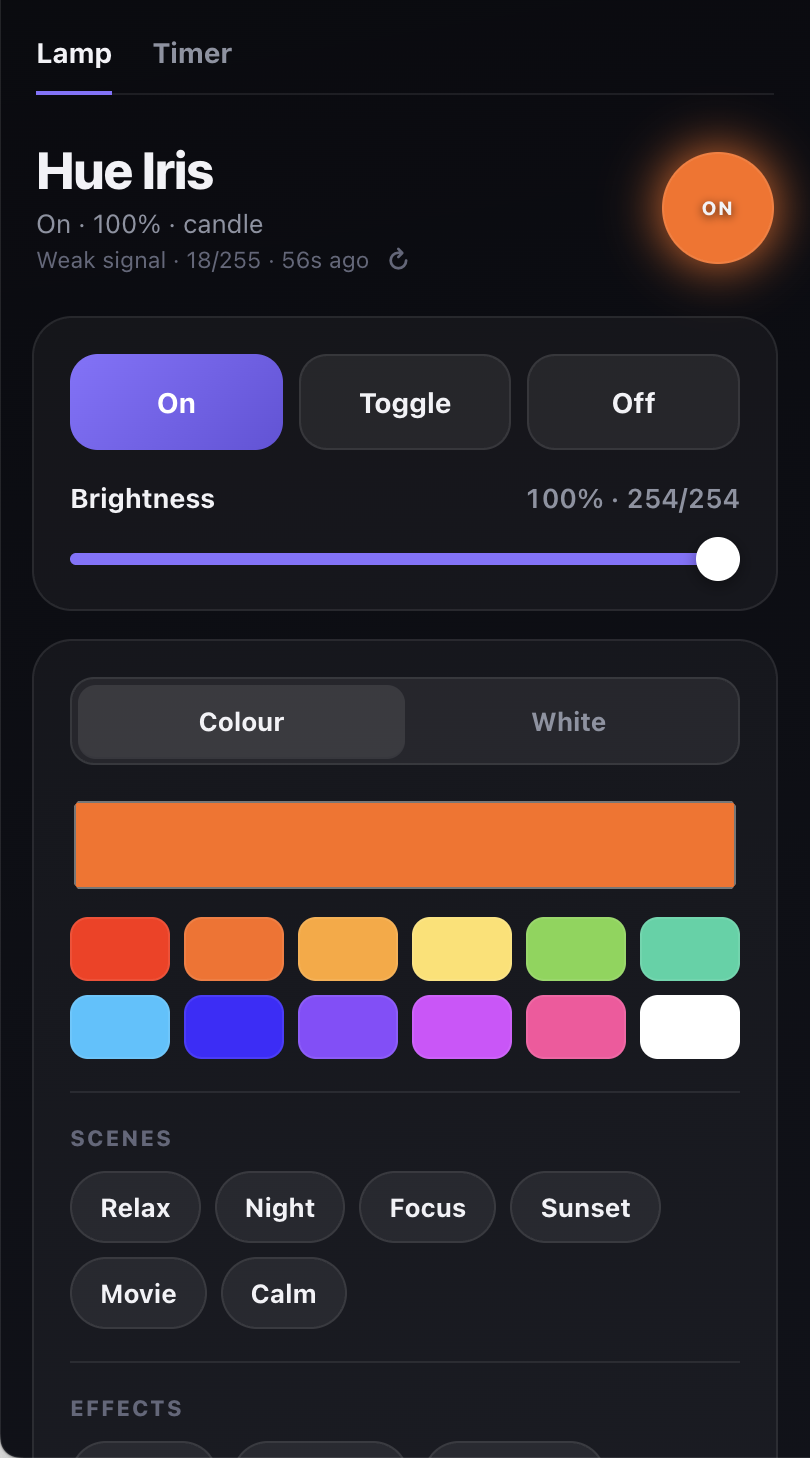
The page is a single HTML string inside app.py, no framework and no external requests, so
there is nothing to build and nothing to serve from a CDN. It went through two redesign
passes on 2026-08-23, and the second one reversed some of the first — worth recording
both, because the reversal is the more useful lesson.
Pass 1 added a lot at once: a heavy pill-shaped nav, an SVG ring + sparkline for radio health as its own always-visible full-width card, a slow "breathing" glow pulse on the orb, and every existing section (Colour, White, Transition, Power-on, Scenes, Effects, Radio) kept as its own separate bordered/blurred card — eight boxed sections stacked in a column just to turn on a light. The reaction: "the ui and ux is awful" — specifically cluttered and hard to use, not a colour or bug complaint.
Pass 2 simplified rather than polished further:
- Fewer, merged cards. The eight cards became two always-visible ones — a Lamp card
(On/Toggle/Off + brightness) and a Colour & effects card (colour, white, scenes,
effects) separated internally by plain
<hr>-style dividers instead of by giving every sub-feature its own bordered box. - A segmented
Colour/Whiteswitch shows exactly one of the two colour controls at a time (setColorMode()toggleshiddenon#colorPane/#whitePane). Both used to be visible simultaneously as equal-weight cards even though they write the samecolorfield — genuinely ambiguous about which one was "the" way to set colour, not just visual clutter. - Advanced settings (transition, power-on behaviour) and the full radio/status panel
moved behind native
<details>disclosure, closed by default. The data is not gone — it is one tap away — it is just not competing for attention with the primary On/Off/ brightness controls by default. - The orb's "breathing" pulse animation was removed outright. Motion that does not carry information reads as "busy," not "alive" — the orb's actual colour/brightness already communicates state; a permanent slow pulse was decoration with no signal.
- Nav is now plain text tabs with an underline (
Lamp/Timer), not a heavy pill — quieter, less visual weight for something used rarely.
What is unchanged from pass 1: brightness shown as both a percentage and the raw n/254
Zigbee value; sliders custom-styled with a filled track (fillTrack() sets a --pct
custom property the CSS gradient reads) and debounced 280–300 ms before publishing, because
the radio link is weak (§10) and a drag firing on every pixel would flood it;
a local-edit guard that ignores incoming state for 1.5 s after you touch a control, so an
SSE frame cannot yank a slider out from under your thumb; and optimistic updates, now in
two layers rather than one — see below.
Two status lines were added under the title, both driven by the same snapshot that drives everything else on the page:
- A plain-language lamp status (
#heroStatus) —"On","Off","On · 79%", or"On · 79% · candle"when an effect is running — because the orb communicates this visually but a reader scanning the page wants it stated, and the smallON/OFFlabel inside the 56px orb is easy to miss. - A minimal live radio-link line (
#heroRadio) —"Weak signal · 18/255 · 21s ago"— giving a glance-level read on link health without expanding the Status disclosure at all. Full detail (ring, sparkline, connection stats, raw JSON) is still one tap away in §7.1; this is deliberately just the headline, in keeping with the pass-2 "minimal, not more cards" direction. Both lines tick every second viatickRadio()(same mechanism as the Status panel's own ticking, §7.1), so "21s ago" keeps counting up instead of only updating on the next snapshot.
Optimistic updates, two layers. The server has always merged a guessed effect into its
own cache and returned the new snapshot in the POST /api/control response (§6).
As of the "make responses super fast" pass, the client also renders a local guess
(localOptimisticSnapshot()) synchronously, before the fetch to /api/control even
starts — so tapping On/Off/Toggle/a scene/an effect flips the UI instantly regardless of
how long the real Wi-Fi → Pi → MQTT → Zigbee round-trip takes on a weak link. The real
snapshot overwrites the guess a beat later, same as before; the difference is the tap itself
no longer waits on the network to look like it did anything.
The radio panel
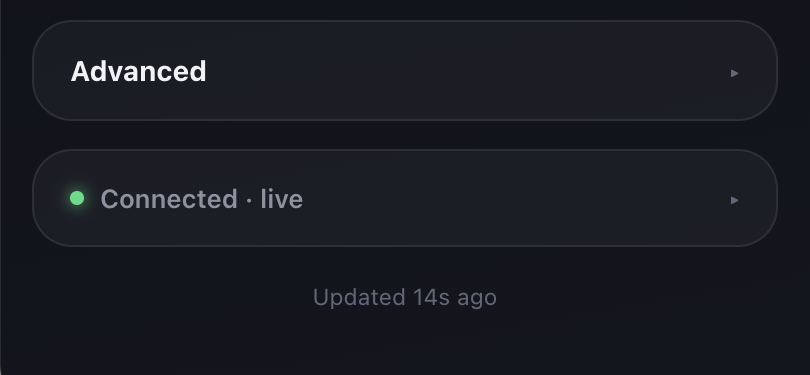
Introduced in pass 1 as its own always-visible card; in pass 2 it moved inside a collapsed
<details class="section"> — its dot-plus-text summary line is always visible (that is
also what drives the minimal #heroRadio line above), but the ring/sparkline/stats/raw-JSON
body is opt-in. Built on the radio telemetry from §4.1:
- An SVG ring (
stroke-dasharray/stroke-dashoffset,.7stransition), coloured by the same good/fair/weak tiers (lqiTier()) the original signal bars used. Fixed 2026-08-23, after a screenshot showed it: the ring usedstroke-linecap:round, and at a low percentage (e.g. 18/255 ≈ 7%) the arc is so short that the rounded end-caps dominate it — it rendered as a floating disconnected blob sitting on top of the ring rather than reading as a thin percentage-fill arc. Switched tostroke-linecap:butt, which stays a clean flat arc segment at any length. Also switched the row fromalign-items:centertoalign-items:flex-start— centering a fixed 88px ring against a variable-height text block computed an offset that looked misaligned; top-aligning both reads as intentional. - A sparkline (
drawSparkline()) plots the last ~90 minutes ofradio.historyas an inline SVG polyline with a soft area fill underneath. Fixed 2026-08-23: it originally plotted against the LQI value's full theoretical range (0–255), which on a weak link that only ever hovers in a narrow low band (this lamp: roughly 12–36) rendered as a visually dead-flat line with a lot of empty space around it — real fluctuation was there but invisible at that scale. It now auto-scales its Y-domain to the observed min/max in the visible window, with a floor of 20 on the span so a genuinely rock-steady link does not get a few points of pure noise blown up into a dramatic-looking swing. A small caption (#sparklineMax/#sparklineMin) states the actual range plotted, since it is no longer a fixed, assumable 0–255. - "Connected 2h 14m" / "N reconnects since start" from
radio.connected_seconds/radio.reconnects— visibility into MQTT-listener stability that did not exist before at all. - Everything with a clock ticks between snapshots.
tickRadio()runs on a 1 ssetIntervaland recomputes "last contact Ns ago" / "Connected Xh Ym" fromDate.now() - lastSyncLocalplus the last snapshot'sage/connected_seconds, rather than only updating when a new SSE frame or poll arrives.
A manual refresh button (↻, next to the minimal #heroRadio line — §4.1
covers the server side) calls POST /api/radio/refresh and plays a spin animation while
waiting. Fixed 2026-08-23, after being reported as "rotates multiple times
incompletely": the first version used animation: spin .7s linear infinite and cleared it
with a guessed setTimeout(…, 1200) — since 1200 ms is not a clean multiple of 700 ms, the
class was removed mid-rotation and the icon snapped back to 0° instead of finishing. It now
uses a single non-repeating animation (animation: spin .6s ease-in-out 1) and clears itself
on the browser's own animationend event, so it always completes exactly one clean turn no
matter how long the actual network round-trip takes, and a second click mid-spin is a no-op
(refreshRadio() bails out while the button is disabled).
A note on how the screenshots above were actually taken, and where it went wrong — twice, in two different ways, across two passes.
Pass one (superseded): getting a current screenshot meant opening a real, visible Chrome window and driving it with
osascript/AppleScript —make new window, set itsURL,set boundsto a phone-sized rectangle, then macOS's ownscreencaptureon that screen region. Expanding the Status disclosure to also capture the ring/sparkline needed a click, and that is where it went wrong:System Events click at {x, y}targets absolute screen coordinates, not "wherever the Chrome window I just made happens to be." Focus/z-order shifted between activating Chrome and the click landing, and the click (and the screenshot taken right after it) hit other windows on the user's real, live desktop, including what looked like an unrelated active session of theirs. Caught immediately from the screenshot output; the stray window was closed by itsidand the tainted screenshot deleted unused.Pass two (this one) dropped clicking entirely — both figures only need the page's default scroll state (top for the Lamp/Colour card, bottom for the collapsed disclosures), so a scroll is enough and
key code 119/115(End/Home) sent viaSystem Eventsto the named process"Google Chrome"reaches whatever has keyboard focus in that app without any coordinate guess — much lower risk than a coordinate click. That fixed the click problem, but a second, different problem showed up immediately:screencapture -Rcaptures whatever is on top of that screen region, regardless of which window put it there, and the user already had an unrelated, much larger Chrome window open, sitting in front of the new small one. Two captures in a row came back with the wrong content in frame — once another Chrome window's own chrome (address bar, back/forward buttons) bleeding into the crop, once a completely unrelated app's window (a "voice-sync-gallery" tool, with what looked like the user's own project content) covering half the frame. Both were caught by inspecting the crop before using it, and both were deleted unused without being described further. The root cause:set index of window 1 to 1is a no-op — "window 1" always means whatever is currently frontmost, so it never actually promoted the new window. The fix was to address the specific window by its real index (window 2, the one just created) so it becomes index 1 for real, and to re-verify that after every navigation (closing and recreating the window before the second screenshot, since a stale window can silently lose front position again on reload).The lesson carried forward: opening and screenshotting a new Chrome window on the real desktop is low-risk and worth doing again, and driving it by keystroke instead of by coordinate click removes the first failure mode outright. But every capture must still be inspected before it's trusted or used —
screencapture -Rhas no idea which window it's showing you, and this machine reliably has other windows around to prove it. Never skip the "does this crop actually show our own page" check, and never describe or act on content from a window that was not the intended target.
The sleep timer
Merged into this app on 2026-08-23. It used to be a standalone sidecar,
hue-iris-timer.service, listening on its own port 8094 and reaching the
lamp by making an HTTP call to this app's own /api/control over
127.0.0.1 — a real second process, a second port, and a loopback hop just to
turn the lamp off. That sidecar is now disabled (hue-iris-timer.service
is systemctl disable --now'd; its code stays at
~/smart-home/hue-iris-timer/app.py as reference only, nothing runs from
there). Its logic lives in this app's TimerManager class, and its state file
is unchanged — /var/lib/hue-iris-timer/state.json — so an in-flight timer
survived the merge without needing migration.
One port for everything now: 8091. The timer gets its own page at
/timer (reachable from the shared Lamp / Timer tab bar at the top of both
pages — see §7) — same UI as the old sidecar's page, just served from the
merged app — plus its own small API:
| Route | Returns |
|---|---|
GET /timer | the sleep-timer page |
GET /api/timer | the timer's snapshot: active, deadline_epoch, remaining_seconds, last_result |
POST /api/timer | {"duration_seconds": N} or {"deadline_epoch": T} — schedules the lamp to turn off then |
DELETE /api/timer | cancels the active timer |
Internally, TimerManager._turn_off() no longer makes an HTTP request to
itself — it calls clean_command() / mosquitto_pub() / STORE.apply()
directly, the same functions POST /api/control uses, so the timer's "OFF" is
indistinguishable from a browser click. The timer's own background thread
(TimerManager._run) is unchanged from the sidecar: it sleeps until the
deadline, retries every HUE_TIMER_RETRY_SECONDS (15s default) on failure,
and persists to the state file on every change so a restart doesn't lose a
pending timer.
The unit file (/etc/systemd/system/hue-iris.service) gained one line —
StateDirectory=hue-iris-timer — so the merged app keeps write access to the
existing state directory, plus Environment=HUE_TIMER_STATE_FILE=… pointing
at the same path the sidecar used. No new directories, no state loss.
Operating and debugging
# service
sudo systemctl restart hue-iris        # after editing app.py
systemctl status hue-iris
journalctl -u hue-iris -f              # live logs
curl -s localhost:8091/healthz         # machine-readable health

# talk to the lamp directly, bypassing the app entirely
D=zigbee2mqtt/0x0017880106550bca
mosquitto_pub -h 127.0.0.1 -t $D/set -m '{"state":"TOGGLE"}'
mosquitto_pub -h 127.0.0.1 -t $D/get -m '{"state":""}'   # then watch:
mosquitto_sub -h 127.0.0.1 -t $D -v

# watch everything Zigbee2MQTT says
mosquitto_sub -h 127.0.0.1 -t 'zigbee2mqtt/#' -v
Debug order when the page is wrong. The three status fields in /api/state localise
the fault before you touch anything:
If Zigbee2MQTT is restarted, the app recovers on its own: the listener's
mosquitto_sub survives (it is talking to Mosquitto, not to Zigbee2MQTT), and the next
five-minute probe re-reads the lamp. To force it, restart hue-iris — it primes on
every connect.
The Zigbee2MQTT web frontend is at http://100.109.212.51:8090/, useful for pairing,
renaming, and seeing the mesh map.
Known issues and loose ends
The radio link is weak. The lamp reports LQI 12 of 255, which the panel correctly labels "Weak Zigbee connection". It works — every command in testing landed — but this is the thing most likely to cause an intermittent failure, and it is a physical problem, not a software one. Options, in order of effort: move the Sonoff dongle onto a USB extension cable away from the Pi (the Pi Zero's own Wi-Fi at 2.4 GHz sits right on top of Zigbee channel 11); move Zigbee to channel 25, which is clear of most Wi-Fi; or add a mains-powered Zigbee device between the two to act as a router.
hue-web.service on port 8080 is dead and should be retired. It is a second, older
dashboard that talks to a Hue Bridge at 192.168.178.44 over its REST API. That path
no longer exists — the lamp was re-paired to the Pi's own Zigbee dongle, so the bridge no
longer has it:
$ curl -s localhost:8080/api/status
{"ok": false, "error": "resource, /lights/1, not available"}
Every page load and every one of its 10-second polls fails. It is still enabled and
starts at boot. Nothing in this note depends on it, and turning it off frees port 8080 and
a little memory:
sudo systemctl disable --now hue-webLeft running for now — this is a judgement call about a service outside the scope of the Hue Iris work, so it is flagged rather than removed.
The device has no friendly name. In Zigbee2MQTT it is still
0x0017880106550bca. Renaming it in the frontend would make the topics readable, but the
app's HUE_IRIS_DEVICE would have to be updated to match in the same breath.
The color_temp: 366 in the state payload is a ghost. Zigbee2MQTT reports it because
it once knew a value; it is neither settable nor meaningful for this lamp. It is shown in
the raw-state panel and ignored everywhere else.
No authentication. The app is open to anyone who can reach port 8091 — that means the home LAN and the Tailscale network. That is the same posture as the MD Engine on 8031, and appropriate for a light switch, but worth knowing before the Pi is ever exposed more widely.